It seems that the filters available or the data that is being pulled in Power BI around ticket response time is rounding the time rather than giving the accurate time of the response. We use ticket due time and response time as one of our key metrics for workload and overall health of the operations in the area. Having some more granularity when it comes to the accurate response time on tickets and adding some functionality around the time remaining on the ticket when you compare the due time to the response time would greatly improve our current process of pulling that data. Attached is an example of the "Locate DateTime" in Power BI compared to the response time in the tickets.
Hi Logan, we are excited to inform you that your request has been successfully implemented and is now live! Thank you for your valuable feedback that helped drive this improvement. As part of this update, you’ll need to replace your existing datetime dimensions with the newly added ones highlighted in the screenshot below.
0 Votes
Lindsay Rennerposted
9 months ago
Admin
Thank you for submitting your request! We value your input and are thrilled to report that this is already underway and is expected to be available within the next few releases. Keep an eye on the release notes, and we'll be sure to update here as well.
It seems that the filters available or the data that is being pulled in Power BI around ticket response time is rounding the time rather than giving the accurate time of the response. We use ticket due time and response time as one of our key metrics for workload and overall health of the operations in the area. Having some more granularity when it comes to the accurate response time on tickets and adding some functionality around the time remaining on the ticket when you compare the due time to the response time would greatly improve our current process of pulling that data. Attached is an example of the "Locate DateTime" in Power BI compared to the response time in the tickets.
Attachments (5)
Screenshot 2026-01-22 080004.png
6.3 KB
Screenshot 2026-01-22 075734.png
16.4 KB
Screenshot 2026-01-22 080934.png
7.92 KB
Screenshot 2026-01-22 081101.png
5.8 KB
Screenshot 2026-01-22 081132.png
5.26 KB
0 Votes
2 Comments
Lindsay Renner posted 7 months ago Admin
Hi Logan, we are excited to inform you that your request has been successfully implemented and is now live! Thank you for your valuable feedback that helped drive this improvement.
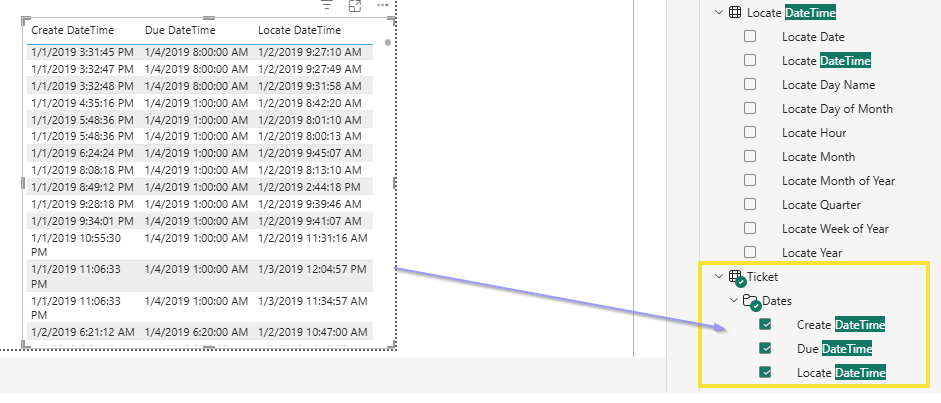
As part of this update, you’ll need to replace your existing datetime dimensions with the newly added ones highlighted in the screenshot below.
0 Votes
Lindsay Renner posted 9 months ago Admin
Thank you for submitting your request! We value your input and are thrilled to report that this is already underway and is expected to be available within the next few releases. Keep an eye on the release notes, and we'll be sure to update here as well.
0 Votes
Login or Sign up to post a comment